
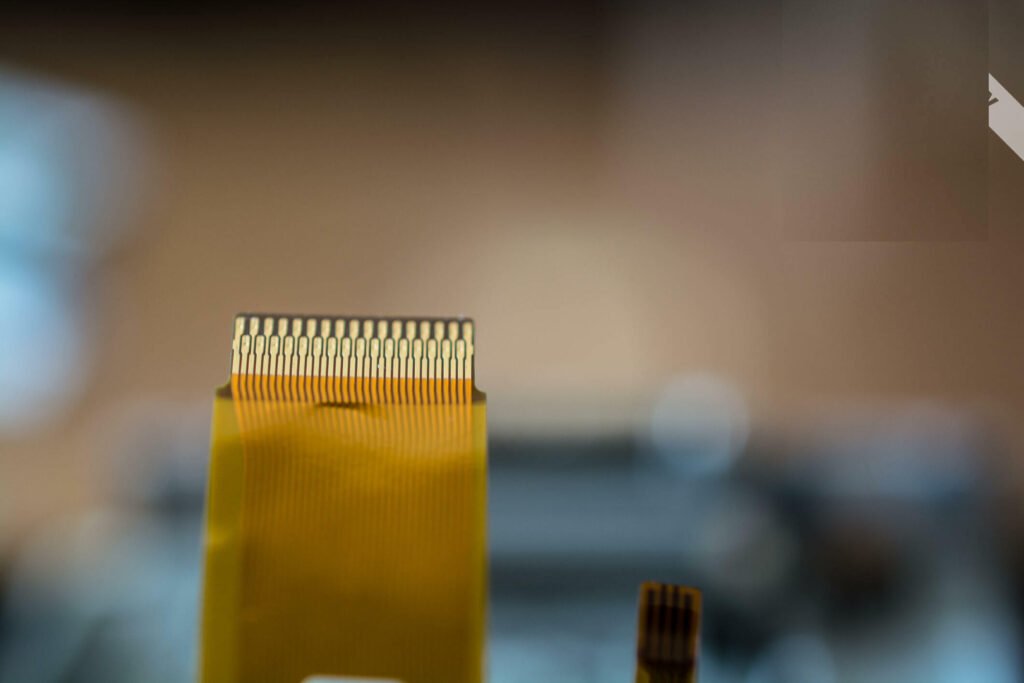
Choosing the right flat ribbon cable means matching its pitch, pin count, insulation, and connector type to what your project needs. You might have problems like the cable breaking if it moves a lot, signal problems, or connectors that do not fit. Many engineers find flat ribbon cable hard to use because it is not as strong and can get damaged more easily than other cables. Make sure to look at important things like how far apart the wires are and how much heat the cable can handle. If you follow each step carefully, you will make fewer mistakes and your cable will work well in your system.
Key Takeaways
- Make sure the cable’s pitch, pin count, and connector type fit your device. This helps you avoid connection problems.
- Look at voltage and current ratings closely. This keeps your project safe. It also stops cable damage or fire.
- Pick cable length and flexibility for your project’s space and movement. This helps the cable last longer.
- Use good insulation and shielding. This protects your cable from heat, chemicals, and electrical problems.
- Test cables before using them fully. Work with trusted suppliers to get good quality and avoid mistakes that cost money.
Project Requirements
Device & Application
Start by thinking about what device you have and how you will use the ribbon cable. Different devices need different things from a cable. Some devices, like medical or military equipment, need cables that block electromagnetic interference and can handle high heat. Computers and printers use flat ribbon cables inside because they are easy to put in and keep neat.
Here is a table that shows how the type of device changes what kind of ribbon cable you should pick:
| Device/Environment Type | Ribbon Cable Specification | Reason/Requirement |
|---|---|---|
| Industrial devices (high temp) | High-temperature ribbon cables | Materials withstand high temperatures |
| Humid or waterproof environments | Strip power waterproof ribbon cables | Resist humidity and waterproofing |
| Devices with specific wiring needs | Conductor count: 10-64; Wire spacing: 0.025″-1mm | Matches wiring requirements |
| Devices with rigid PCBs | Use more connectors; cheaper PCB | Rigid PCB cheaper but requires more connectors |
| Devices with flexible PCBs | Simpler assembly; fewer failure points | Flexible PCB allows simpler cable assembly |
| Devices needing mass termination | Ribbon cables with rigid spacing for IDC connectors | Enables efficient mass termination, cost saving |
| Applications (computers, medical, military) | Cable flexibility, durability, EMI/RFI resistance, connector types | Ensures optimal performance and reliability |
Tip: Always look at the manufacturer’s catalog or your device’s manual. This helps you find the right cable for your device and keeps it safe.
Connector & Pin Count
It is very important to match the connector and pin count when you build a ribbon cable. The cable’s pitch and number of wires must fit the idc connectors you want to use. IDC connectors come in standard sizes, like 1.27 mm, and have common pin counts such as 10, 14, 20, 26, 34, 40, and 50. Each wire in the cable connects to a pin on the connector, so the numbers must match.
- Always count the pins on your idc connectors and pick a ribbon cable with the same number of wires.
- Use edge marks or color stripes on the cable to find pin 1 and avoid mistakes.
- If you need a special size, you can cut a bigger cable to fit, but make sure it still works with your idc connectors.
Note: If you use the wrong pin count or pitch, your device might not work right or could get damaged.
Voltage & Current
You must check the voltage and current ratings for your ribbon cable. Most flat ribbon cables with 28 AWG wires can carry about 1.5 amps per wire. But idc connectors usually only let you use 1.0 to 1.5 amps. For industrial jobs, cables can have a voltage rating up to 300 volts and must meet UL rules for fire safety. In home electronics, the voltage rating is lower, about 125 volts AC.
- Never go over the voltage or current limit for your cable or connectors.
- If you need more current, you can use more wires together, but the connector must allow this.
- Using cables past their limits can cause them to get too hot, break, or even start a fire.
Safety Alert: Always use cables with flame-resistant covers and make sure they are connected right to stop electrical accidents.
Length & Flexibility
How long and bendy your ribbon cable is will change how well it works and how long it lasts. For fast signals, try to keep the cable shorter than 50 cm to stop signal loss. If you need a longer cable, use good grounding, shielding, or signal ends to keep the signal strong.
Flexibility depends on the jacket material and how many strands are in each wire. Polyurethane jackets and more strands make cables easier to bend and stronger for moving parts. If your project needs the cable to bend or move a lot, pick a cable made for that. Always follow the smallest bend size the maker says, so you do not break the wires or the cover.
- For cables that do not move, regular cables are fine.
- For moving parts or small spaces, pick flexible cables with strong jackets.
- Check the maker’s info for how many bends the cable can take and what temperatures it can handle.
Remember: Picking the right cable for where you use it helps it last longer and saves money on repairs.
Flat Ribbon Cable Specs
Pitch & Ribbon Cable Sizes
When you pick a flat ribbon cable, you need to check the pitch and size. Pitch is how far it is from the middle of one wire to the next. Some common pitches are 0.05 inches (1.27 mm), 0.5 mm, 1.0 mm, 1.25 mm, and 2 mm. The 0.05 inch (1.27 mm) pitch is used a lot. Many computers and devices use this pitch for their connectors. You will see this size in computers and floppy disk drive cables.
Ribbon cable size depends on pitch and how many wires it has. A cable with 20 wires at 1.27 mm pitch is wider than one with 10 wires at the same pitch. You must match the cable size to your connectors. If the pitch or wire count is wrong, the cable will not fit. Your wiring will not work if the size does not match.
Tip: Always measure the pitch carefully. Even a small mistake can make the cable not fit.
Big ribbon cables with more wires are harder to bend and take up more space. Small ribbon cables are easier to fit in tight places and look neater. Think about how much space you have and what connectors you need before you choose.
- The connector and cable size must match for good wiring.
- Cable size changes how easy it is to bend and use.
- Power and data depend on the cable and connector.
- How tough and sealed the cable is can change with size.
- The way the connector faces and how long it lasts also depend on cable size.
Conductor Material
Most flat ribbon cables use copper for the conductor. Copper is good because it lets electricity flow easily and does not resist much. For example, a 28 AWG copper wire has about 0.21 to 0.23 ohms resistance per meter. This low resistance helps your wiring work well and saves power.
You should also think about the size of the conductor. Thicker wires (lower AWG) can carry more current but are stiffer. Thinner wires (higher AWG) are easier to bend but carry less current. Always check the wire size to make sure it fits your needs. If you use the wrong size, the cable could get too hot or stop working.
Note: Tin-plated copper is used a lot in flat ribbon cables. The tin helps stop rust and makes soldering easier.
Insulation Types
The insulation around each wire keeps your wiring safe from shorts, heat, and chemicals. There are a few common insulation materials in flat ribbon cables:
| Insulation Material | Temperature Resistance | Key Characteristics |
|---|---|---|
| PVC (Polyvinyl Chloride) | Low temperatures; limited heat tolerance | Strong, flame resistant, but makes toxic smoke if burned |
| PE (Polyethylene) | Medium temperatures; breaks down in high heat | Great electrical insulation, good against chemicals |
| XLPE (Cross-linked Polyethylene) | Up to 125°C all the time, 250°C for short times | Handles heat well, strong and tough |
| Silicone Rubber | 150°C to 250°C | Very flexible, good for high heat |
| Fluoropolymers (PTFE, PFA, FEP, ETFE) | -100°C to 250°C | Great against chemicals and fire |
If you need a cable for high heat or tough places, pick fluoropolymer or silicone rubber insulation. These protect your wires better than PVC or PE. FEP insulation works from -65°C to +200°C and fights chemicals and fire. This is good for planes or factories.
Safety Alert: The right insulation keeps your wiring safe and stops electrical problems.
Color Coding & Markings
Color coding and edge marks help you find each wire in a flat ribbon cable. Most cables use a color pattern every 10 wires: brown, red, orange, yellow, green, blue, violet, gray, white, and black. This makes it easy to follow each wire when you work or fix things.
- Most cables have a red stripe on the edge for pin 1. This helps you not plug the cable in backward.
- Rainbow ribbon cables use the color pattern to help you find wires fast.
- For cables with lots of wires, makers may use numbers, printing, or colored wraps to mark groups.
Remember: Good color coding and marks help you make fewer mistakes and work faster.
Color coding follows rules, so you can always find the right wire. This helps you avoid mistakes, especially with insulation displacement connectors (IDCs).
Shielding & EMI
Shielding keeps your flat ribbon cable safe from electromagnetic interference (EMI). EMI can mess up data, cause signal loss, or make devices fail. There are different types of shielding:
| Shielding Type | Coverage | Advantages | Disadvantages | Effectiveness at EMI Reduction |
|---|---|---|---|---|
| Foil Shield | 100% coverage | Thin, light, blocks all signals | Tears when bent, hard to connect | Good for some noise, not strong if bent a lot |
| Braid Shield | 70-95% coverage | Low resistance, easy to connect | Makes cable bigger and costs more, not full cover | Better than foil, lasts longer |
| Foil-Braid Combo | Both together | Best EMI protection, stops crosstalk | Costs more, bigger size | Best for very noisy places |
| Spiral Wrapped | N/A | Flexible, does not tear easily | Does not cover everything | Good for cables that bend a lot |
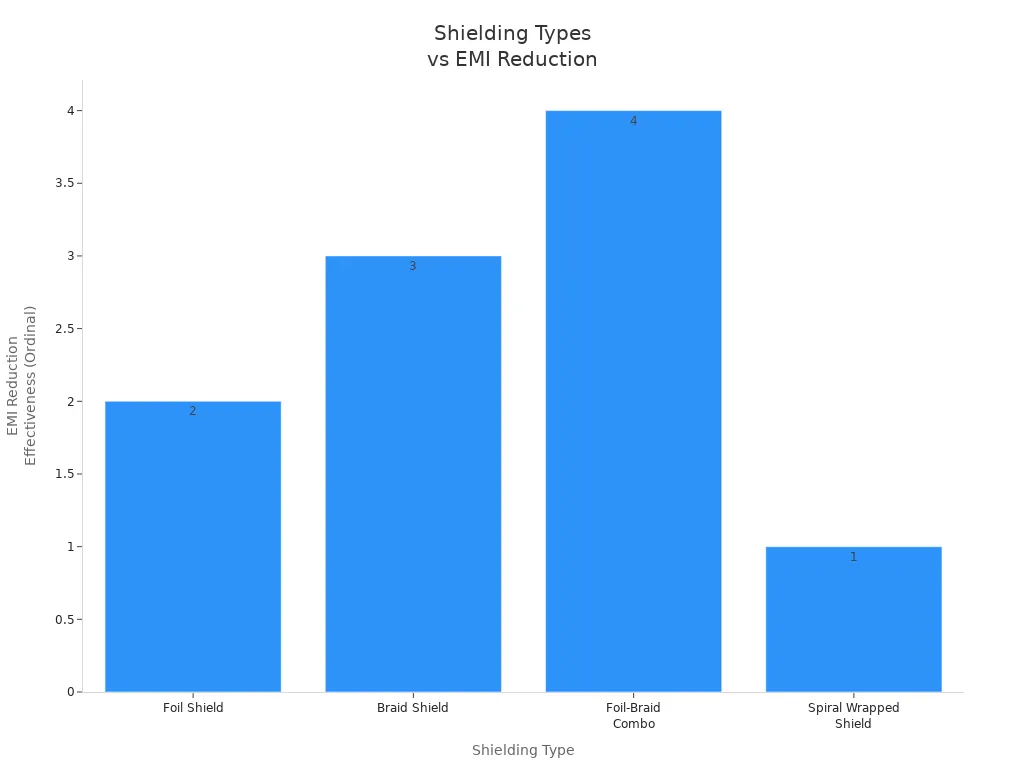
Flat ribbon cables without shielding can pick up EMI and crosstalk more easily. Shielded cables keep your wiring safe from outside noise and protect your data. Always ground the shield right and use connectors that fit the shield. In places with lots of noise, a foil-braid combo works best.
Tip: Shielding is important for sending data safely. Without it, your wiring can have errors and lose signals.
Flexible Ribbon Cable & Application
Data vs. Power Use
You should know if your project sends data, power, or both. Flexible ribbon cable is great for data in things that bend, like laptops or cameras. These cables work well with fast signals and block outside noise. If you use them for power, check the current rating first. Make sure the cable can handle the power you need. Flexible ribbon cable is light and does not take up much space. This makes it good for portable electronics, cars, and even airplanes. In crowded computers or 5G devices, these cables fit in small spots and help send data fast.
Environmental Needs
Think about where you will use the cable. Humid air can make the insulation soak up water. This can make the cable swell and get weak. It might cause electrical problems. Hot places make this worse and can crack the insulation. To keep your cable safe, pick materials like polyimide films or add special coatings. You can use sealed connectors and keep cables away from heat. These steps help your cable last longer, even in tough places.
- Humidity can make insulation weak and less reliable.
- Heat can crack cables and make them stop working.
- Good materials and smart design help cables last in harsh places.
Mechanical Flexibility
Flexible ribbon cable is best when you need to bend or twist it a lot. Robots, portable electronics, and cars use these cables because they move often. For jobs with lots of movement, pick cables with fine stranded wires and strong jackets like Flexx-Sil rubber. These cables can bend many times without breaking. The flat shape helps the cable fit in tight spaces and keeps things tidy. Always check the flex rating and pick a cable made for your movement needs.
Tip: Use flexible ribbon cable with high-flex life for moving parts. This helps your project last longer and need fewer repairs.
Custom Ribbon Cables & Sourcing
Customization Options
Sometimes, regular cables do not work for your project. Custom ribbon cables let you pick every part to fit your needs. You can choose the pitch, how many wires, wire size, and assembly type. Many companies help you from the start. They use computers to make a plan and build a sample to test. This way, you get a cable that fits your device.
Here is a table with ways to change your cable:
| Customization Aspect | Options / Details |
|---|---|
| Pitch Spacing | 0.025″, 0.050″, 0.100″, 0.156″, custom spacing |
| Conductor Count | 4, 6, 8, 9, 10, 14, 15, 16, 18, 20, 24, 25, 26, 34, 37, 40, 50, 60, 64, 80 |
| Wire Gauge | 18 AWG to 34 AWG, stranded copper, finer gauges available |
| Assembly Types | Mini FAKRA, Standard FAKRA, Flat Ribbon, IDC Ribbon, Twisted Pair, Shielded, Color-Coded |
| Special Configurations | Folded ribbon cables, pre-creased for tight spaces |
You can also pick the cable length, connector, and shielding. Some cables have special features for tough places or small spaces. This helps you stop problems and makes your system better.
Tip: Work with engineers early in the design. This makes sure your custom ribbon cables fit your project.
Supplier Selection
Picking the right supplier for custom ribbon cables matters a lot. You need someone who knows what you want and gives good products. Find suppliers with lots of choices and strong quality rules. Check if they have certifications like ISO 9001 or IPC/WHMA-A-620.
Here are some things to think about when you pick a supplier:
| Criterion | Description |
|---|---|
| Cable Type | Match to your signal or power needs, and the environment where you will use the cable. |
| Shielding | Needed for noisy environments to stop interference and crosstalk. |
| Insulation | Pick materials that resist heat, chemicals, and abrasion. |
| Strain Relief | Look for options like backpotting or heat-shrink for extra durability. |
Note: Always ask for samples before you buy a lot. This lets you check if the cables are good and fit well.
Testing & Quality
Testing is very important when you order custom ribbon cables. Good suppliers test each batch for safety and how well it works. They may use ISO or IPC rules for their tests. You should ask for test reports or certificates. This helps you trust that your cables will work right.
You can also test the cables yourself. Try them in your system before you order more. Check if they fit, send signals well, and are strong. If you find problems, talk to your supplier to fix them before you buy more.
Remember: Careful testing and checks help you avoid mistakes and keep your project working well.
Mistakes to Avoid
Compatibility Errors
You can have problems if you do not check if things fit together. Many mistakes happen when cables or connectors do not match your project. For example, using the wrong pitch or pin count with idc connectors can stop your device from working. Sometimes, a cable does not fit the connector or device. This can make signals weak or even break your equipment.
Here is a table that shows common compatibility errors and how you can avoid them:
| Common Compatibility Errors | Description | How to Avoid |
|---|---|---|
| Vague Design Descriptions | Imprecise specs cause misinterpretation and errors. | Give clear specs for voltage, temperature, flexibility, and gauge. |
| Assembly Difficulty | Mismatched wire and terminal pairings cause delays. | Check physical sizes and insulation before assembly. |
| Disregarding Connector Compatibility | Using connectors that do not match cable design leads to problems. | Pick connectors that fit both physical and electrical needs. |
| Over-Specifying Specifications | Tight tolerances increase cost and complexity. | Balance precision with practicality for easier manufacturing. |
Do not use unshielded cables in places with lots of noise. Always check the cable specs and where you will use them. Pick cables made for indoors or outdoors as needed. EMI shielding is needed for fast signals. Choose idc connectors that fit both the cable and the device.
Ignoring Ratings
If you do not look at voltage and current ratings, your project can be unsafe. Using a cable with a low voltage rating can break the insulation. This might cause short circuits or even fires. If a cable cannot handle the current, it can get too hot. Hot cables can melt and hurt your devices. Too much current can even start a fire, like when a power strip gets too hot.
- Always check voltage and current ratings before using a cable.
- The right cable keeps your project safe and working well.
- Cables with the right ratings last longer and work better.
Picking the right cable and following ratings keeps things safe and helps your devices last.
Skipping Testing
Not testing your cables can cause big problems later. If you do not test cables before using them, you might miss bad connections or wrong pinouts. Even if you pick the right cable and idc connectors, you need to check if they work together. Testing helps you find problems early so you can fix them.
- Test each cable in your system before using it fully.
- Look for weak signals, fit, and strength.
- Ask your supplier for test reports or certificates.
Tip: Careful testing saves time and money. It helps you avoid failures and keeps your project running smoothly.
You can choose the right flat ribbon cable by following a few simple steps. First, match the cable specs to your project. Next, check the connector, pin count, and ratings. Use this quick checklist:
- Confirm pitch and pin count
- Review voltage and current ratings
- Test cables before final use
Always double-check your specs. If you feel unsure, talk to a supplier or expert for help.
FAQ
What is the difference between flat ribbon cable and round cable?
Flat ribbon cables have wires lined up side by side. Round cables twist wires together in a bundle. Flat cables save space and make wiring easy to follow. Round cables bend more easily and protect wires better from outside damage.
How do you know which pitch to choose?
You should match the pitch to your connector. Measure the distance from the center of one wire to the next. Common pitches are 1.27 mm and 2.54 mm. Always check your device manual or connector datasheet for the right size.
Can you cut flat ribbon cable to a custom length?
Yes, you can cut flat ribbon cable to the length you need. Use sharp scissors or a cable cutter for a clean edge. Make sure you do not damage the wires inside. Always double-check the pin count after cutting.
Do flat ribbon cables need shielding?
Shielding helps block electromagnetic interference (EMI). You need shielding if your project has fast signals or works near noisy electronics. For simple or short connections, you may not need it. Always check your environment and signal needs before choosing.
