

Selecting the right FFC for your LCD display makes a big difference in compatibility and performance. You need to understand the connector on your LCD and the specifications of the cable. If you want the best reliability, always check that your cable matches every requirement. Reliability matters at every step, from design to installation. For the best results, choose a trusted supplier like YLS Cable. This Ultimate Guide helps you make the right choice.
Key Takeaways
- Selecting the right FFC is crucial for compatibility and performance in LCD displays. Always match the cable specifications to your display’s requirements.
- Pay attention to pitch size and contact count. Mismatches can lead to poor signal transmission or damage. Use a table to compare options before ordering.
- Choose the correct actuator type based on your usage. ZIF connectors are best for static applications, while LIF connectors suit frequent connections.
- Consider environmental factors like temperature and moisture. Select FFCs made from durable materials to ensure long-term reliability.
- Engage with trusted suppliers like INEED for technical support and custom solutions. Their expertise can help you avoid common mistakes and improve your project’s success.
FFC and FPC/FFC Connector Basics
What Is an FFC Flexible Cable
You often see an ffc flexible cable in electronic devices. This cable uses parallel copper conductors pressed onto a flat plastic film. You get a lightweight and compact solution for connecting components in tight spaces. In lcd display applications, ffc flexible cable helps you achieve reliable signal transmission and easy installation. YLS offers ffc flexible cables with different pitch sizes and conductor counts, so you can match your project’s needs. You benefit from fast sample turnaround and strict quality control, which ensures reliability in your display.
| Function/Role | Description |
|---|---|
| Infotainment Systems | Connects screens, GPS devices, and audio systems for user enjoyment. |
| Advanced Driver-Assistance Systems (ADAS) | Utilizes sensors, cameras, and control units to enhance driving safety. |
| Powertrain and Chassis Control | Sends signals to manage engine, brakes, and vehicle stability. |
| In-flight Entertainment Systems | Provides screens, speakers, and controls for passenger entertainment. |
| Navigation and Communication Equipment | Essential for sending signals in aircraft systems. |
| Environmental Control Systems | Maintains temperature and pressure for passenger comfort in aircraft. |
| Compact Design and Lightweight | Ideal for small spaces and reduces overall device weight. |
| Protective Layer | Safeguards internal components from damage, enhancing durability. |
FPC vs. FFC: Key Differences
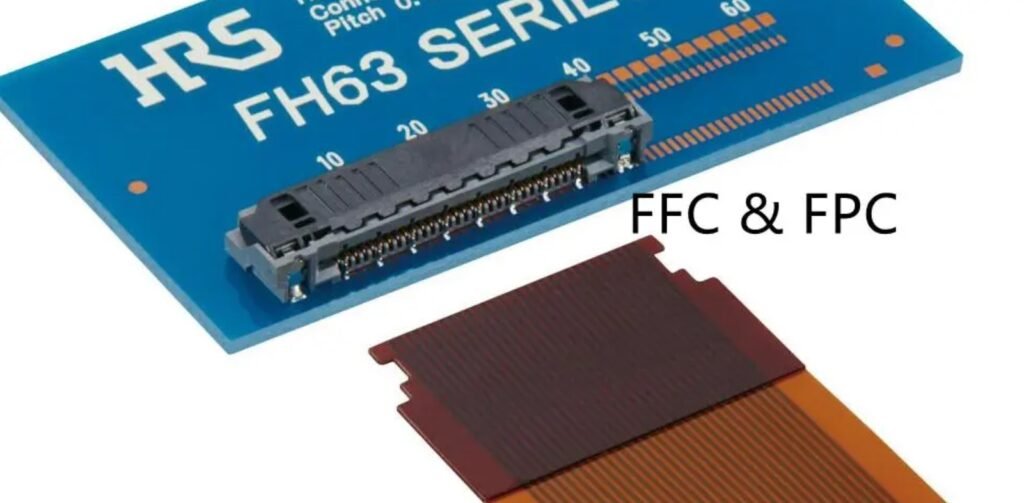
You may wonder about the difference between ffc and fpc cables. Both connect electronic parts, but their structure and flexibility set them apart. Ffc cables use parallel copper conductors on a flat plastic film. Fpc cables use etched copper circuitry on polyimide films. Ffc cables are thicker and less flexible. Fpc cables are thinner and bend in more directions. You often use ffc cables in consumer electronics like smartphones and laptops. Fpc cables work better for advanced electronics that need complex routing.
| Feature | FFC Cables | FPC Cables |
|---|---|---|
| Structure | Parallel copper conductors on flat plastic film | Etched copper circuitry on polyimide films |
| Flexibility | Thicker and less flexible | Thinner and can bend in multiple directions |
| Typical Applications | Consumer electronics like smartphones and laptops | Advanced electronics requiring complex routing |
Connector Types for LCD Displays
You must choose the right fpc/ffc connector for your lcd display. The connector type affects compatibility and reliability. Common fpc/ffc connector types include the I-pex metal connector, which offers good electrical conductivity and durability. When you select a connector, pay attention to pitch, pin arrangement, and connector design. These factors help you ensure a secure fit and reliable performance.
| Factor | Description |
|---|---|
| Pitch | The distance between the centers of two adjacent pins, crucial for ensuring proper connection. |
| Pin Arrangement | The specific layout of pins that must match between the ffc and the lcd display connector. |
| Connector Design | The design, such as closed end or open throat, affects the ease of insertion of the ffc. |
Tip: INEED focuses on reliability and quality in every fpc/ffc connector. You get technical support and custom solutions for your lcd display projects.
Ultimate Guide to FFC Selection Criteria
When you select an FFC for your LCD, you need to understand the main criteria that affect compatibility, reliability, and performance. This ultimate guide helps you make informed decisions for your display project. You will learn how to match pitch size, contact count, actuator type, and other key features to your application. INEED provides customized solutions and strict quality control, so you can trust your connector selection.
Pitch Size and Number of Contacts
Pitch size and the number of contacts are the foundation of any FFC flexible cable choice. Pitch size means the distance from the center of one contact to the center of the next. You must match the pitch specifications of your LCD connector to the FFC. If you choose the wrong pitch, the cable will not fit, and you risk poor signal transmission or even damage.
The number of contacts determines how many signals or power lines you can connect. More contacts allow for more complex data transmission, but you need to ensure your LCD and FFC match exactly. Always check the datasheet for both your display and the FFC flexible cable.
Tip: Use a table to compare your LCD connector and FFC options. This makes it easier to spot mismatches before you order.
| Criteria | Description |
|---|---|
| Pitch Size | Match the LCD connector’s pitch to the FFC for proper fit and signal requirements. |
| Number of Contacts | Ensure the FFC has the exact number of contacts needed for your display’s data transmission. |
You can find FFCs with pitch sizes from 0.4mm to 1.25mm and up to 96 contacts. This flexibility helps you meet the needs of high-density or simple LCD applications.
Actuator Type: ZIF and LIF
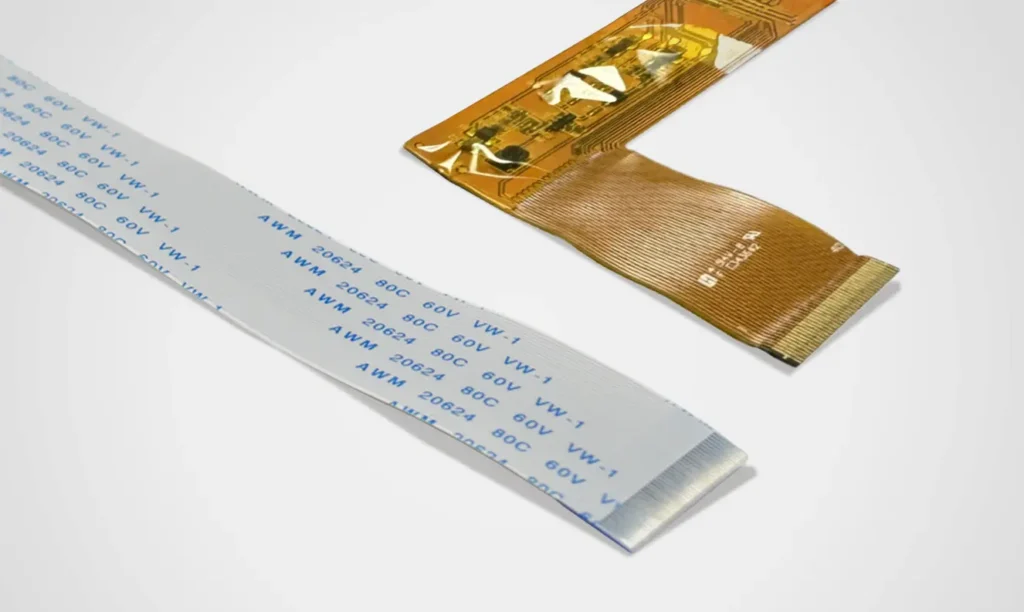
The actuator type affects how you insert and secure the FFC into the connector. You will see two main types: ZIF (Zero Insertion Force) and LIF (Low Insertion Force).
ZIF connectors use a locking mechanism. You insert the FFC flexible cable with almost no force, then lock it in place. This design reduces wear on the contacts and improves reliability for static applications. LIF connectors do not have a lock. You push the cable into place, which is faster but may not hold as firmly in high-vibration environments.
Here is a quick comparison:
| Feature | ZIF Connectors | LIF Connectors |
|---|---|---|
| Reliability | Good for static use, limited cycles (25-30) | More durable for frequent connections |
| Ease of Use | Locking mechanism, larger footprint | Simple design, easy handling |
| Cost | Higher due to complexity | More economical for low-pin-count uses |
| Application | Not for frequent unplugging or vibration | Good for simple, stable connections |
You should choose the actuator type based on how often you will connect and disconnect the cable, and the environment where your LCD will operate.
Contact Location and Structure
Contact location and structure play a big role in connector selection. You need to decide if you want contacts on the same side or on opposite sides of the FFC. This choice depends on your LCD’s connector design. If you mismatch the contact location, the cable will not make a proper connection.
The structure of the contact also matters. Some FFCs have reinforced ends for better insertion tolerance. Others use gold plating for improved signal quality and reliability. Always check your LCD’s requirements and match the FFC structure for the best performance.
Note: Proper contact alignment ensures stable signal transmission and reduces the risk of connection failure.
Current, Temperature, and Durability
You must consider the current rating, temperature range, and durability of your FFC flexible cable. These factors affect long-term reliability and safety.
- Current rating: Most FFCs for LCDs handle between 0.5A and 1.0A per contact. For backlight power, a conservative estimate is 250mA per pin. Always check your display’s power needs and choose an FFC that meets or exceeds them.
- Temperature range: Standard FFCs operate from -65°C to 260°C. This wide range covers most LCD environments, from consumer electronics to industrial displays.
- Durability: FFCs face stress from temperature cycling, humidity, chemicals, UV light, and repeated flexing. Over time, these factors can cause copper fatigue, adhesive failure, or signal loss. Choose cables with proven reliability testing and high-quality materials.
Callout: YLS Cable performs strict reliability testing on every FFC flexible cable. You get quality assurance for your LCD project, even in demanding conditions.
When you follow this ultimate guide, you improve your LCD’s performance and reduce the risk of failure. Always match your FFC to your display’s pitch specifications, contact count, actuator type, and signal requirements. For custom needs, YLS Cable offers flexible solutions and technical support. You can trust their expertise for your next eDP screen cable or any other application.
FFC Flexible Cable Selection Steps
Selecting the right FFC flexible cable for your LCD display involves several clear steps. You can follow this guide to ensure compatibility, reliability, and optimal performance for your project.
Identify LCD Connector Requirements
Start by gathering all the technical details about your LCD connector. This information forms the foundation for your selection process. You should check the pin count, look for any ground pads, and confirm connector compatibility. Use the table below to organize your findings:
| Consideration | Description |
|---|---|
| Pin Count | Count the number of pins in the connector. This is essential for matching the FFC. |
| Ground Pads | Identify any ground pads. These may increase the total pin count and require special connectors. |
| Connector Compatibility | Make sure the connector supports the required pin count, including any ground pads. |
You can use a magnifier or a microscope to inspect the connector if the contacts are very small. Accurate identification at this stage prevents costly mistakes later.
Match FFC Specifications
Once you know your LCD connector’s requirements, you need to match them with the right FFC specifications. Pay close attention to the following features:
- Pitch size: Measure the distance between the centers of two adjacent contacts. Use a caliper for accuracy.
- Number of contacts: Count the conductors at the end of the cable. This must match your LCD connector exactly.
- Cable width: Measure the width of the FFC. Use the formula: Pitch = Cable Width / (Number of Conductors + 1).
- Contact location: Check if the contacts are on the same side or on opposite sides. This affects how the cable fits into the connector.
- Actuator type: Decide if you need a ZIF or LIF connector based on your application’s needs.
- Signal requirements: Consider the type of data transmission and any shielding needs for high-speed or sensitive signals.
You may need to customize the FFC to match your display’s requirements. The table below shows common customization options:
| Customization Option | Description |
|---|---|
| Pinout Matching | Match the pinout of your display for proper data transmission. |
| FPC/FFC Size Modification | Adjust the length, width, or pitch for a perfect fit. |
| EMI Shielding Addition | Add shielding to reduce interference and improve signal quality. |
| Custom Connector Addition | Add a custom connector if standard options do not fit. |
| Cable Length Customization | Tailor the cable length to your project’s layout. |
| Cable Pinout Configuration | Reconfigure the pinout for optimal system performance. |
Tip: Always check the tolerance of your measurements. Even a small mismatch can affect contact reliability and signal transmission.
Use a Selection Checklist
A checklist helps you stay organized and ensures you do not miss any critical steps. Follow this process:
- Place the FFC flexible cable flat on a clean surface. Make sure it is not twisted or bent.
- Measure the cable’s width with a ruler or caliper.
- Count the number of contacts at the end of the cable.
- Calculate the pitch using the formula: Pitch = Cable Width / (Number of Conductors + 1).
- Check the pitch at several points along the cable to confirm uniformity.
- Connect the cable to a test fixture and use a multimeter to verify each contact’s functionality.
- Review the test results. Look for any failures or irregularities in signal transmission.
- Inspect the cable for visible defects, such as cracks or uneven contacts.
This checklist ensures you select a high-quality FFC flexible flat cable that meets your LCD’s needs. You reduce the risk of connection failure and improve overall durability.
Verify with Supplier (YLS Cable)
Before you finalize your choice, you should verify all details with your supplier. YLS Cable offers technical support and quality assurance throughout the process. Take these steps:
- Design consultation: Work with YLS Cable’s experts to refine your FFC flexible cable design. They help you improve reliability and performance.
- Prototyping: Request a prototype or sample. Test it in your actual application to confirm fit and function.
- Materials analysis: Ask for information about the materials used. Make sure they meet your requirements for signal quality and durability.
- Quality assurance: Confirm that the supplier performs inspections and tests during manufacturing. This step ensures you receive a reliable product.
Note: Supplier support can save you time and cost. YLS Cable’s technical team helps you avoid common mistakes and ensures your FFC flexible cable works perfectly with your LCD display.
By following these steps, you can select the right FFC for your project. You ensure proper contact, reliable signal transmission, and long-term performance. You also control cost and improve the durability of your final product. For custom needs, such as an eDP screen cable or other specialized applications, YLS Cable provides flexible solutions and ongoing support.
Common FFC Selection Mistakes
When you select a flexible cable for your LCD display, you need to avoid common mistakes that can lead to poor contact, unreliable transmission, and increased cost. Understanding these pitfalls helps you improve durability and performance.
Pitch and Contact Mismatches
You often see problems when the pitch or contact count does not match between the cable and the connector. If you choose the wrong pitch, the cable will not fit, and the contacts will not align. This can cause signal loss or even permanent damage. You must count the contacts carefully and check the pitch with a caliper. Even a small tolerance error can result in a failed connection.
| Mistake | Description |
|---|---|
| Extreme Fragility | The actuator of the connector can break during assembly, risking major damage. |
| Extremely Low Mating Cycles | ZIF connectors support only 10 to 50 cycles, so contacts wear out quickly. |
| Difficult Assembly | Precise alignment and insertion are required, making assembly error-prone. |
Tip: Always verify the pitch and contact count before ordering your flexible cable. This step saves you cost and prevents assembly issues.
Overlooking Environmental Needs
You need to consider the environment where your cable will operate. Moisture and temperature changes can affect contact reliability and cable durability. If you ignore these factors, you risk swelling, reduced dielectric strength, and mechanical stress. Choosing high-performance materials like polyimide improves moisture resistance and thermal stability.
| Environmental Factor | Description |
|---|---|
| Moisture Resistance | Cables can absorb moisture, leading to swelling and reduced contact reliability. |
| Thermal Effects | High temperatures accelerate moisture ingress and cause mechanical stress. |
| Material Selection | Polyimide materials offer better durability and tolerance to harsh conditions. |
Note: Test your flexible cable in real-world conditions. This ensures reliable contact and transmission over time.
Ignoring Connector Compatibility
Connector compatibility affects every contact and the overall function of your LCD. If you ignore compatibility, you may see no display, distorted images, overheating, or even permanent damage to your hardware.
| Consequence | Description |
|---|---|
| No Display | Incompatible connectors or power issues prevent the screen from working. |
| Distorted Image | Wrong resolution or refresh rates cause blurry or stretched images. |
| Overheating | Excessive power draw leads to overheating and reduced durability. |
| Permanent Damage | Severe incompatibility can damage the motherboard or other components. |
Callout: Consult with YLS Cable’s technical team for expert guidance. They help you match every contact, cable, and connector for your LCD or eDP screen cable project, reducing cost and improving durability.
Best Practices for Avoiding Mistakes:
- Engage with manufacturers early to support design and contact reliability.
- Select materials that withstand environmental stress for flexible cable applications.
- Test cables for bend and thermal cycling to ensure long-term durability.
- Optimize layer stack-up for signal transmission and mechanical stability.
- Run customized design rule checks to catch errors before manufacturing.
By following these steps, you avoid costly mistakes and ensure every contact in your flexible cable supports reliable transmission for your LCD display.
You can select the perfect ffc for your high-definition display by following a clear process. Start by matching pitch, pin count, and cable type to your display’s connector. Use a checklist to confirm every detail and avoid mistakes. Reliable suppliers like YLS Cable offer custom options for cable length, shape, and shielding, which help you achieve stable connection performance. If you need unique features or extra support, reach out to YLS Cable for tailored solutions.
FAQ
What is the difference between fpc and FFC cables for LCD displays?
You see fpc cables with etched copper circuits on polyimide film. FFC cables use parallel copper conductors on plastic film. FPC cables bend in more directions. FFC cables work well for simple connections. You choose fpc for advanced routing in LCD projects.
How do you match an fpc cable to your LCD connector?
You check the pitch size and number of contacts on your LCD connector. You measure the fpc cable width and count the conductors. You confirm the contact location matches your connector. You use a checklist to avoid mismatches and ensure reliable signal transmission.
Why does actuator type matter when selecting an fpc cable?
You select actuator type based on how you insert and secure the fpc cable. ZIF connectors use a locking mechanism for low force insertion. LIF connectors push the cable in without a lock. You choose ZIF for static use and LIF for frequent connections.
What environmental factors affect fpc cable performance?
You consider moisture, temperature, and mechanical stress. Fpc cables with polyimide material resist moisture and heat. You test the cable in real-world conditions. You select materials that withstand harsh environments to improve durability and contact reliability.
How do you verify fpc cable quality before installation?
You inspect the fpc cable for defects. You measure pitch and width with a caliper. You test each contact with a multimeter. You request a prototype from your supplier. You confirm the cable passes reliability tests for signal transmission and durability.
