
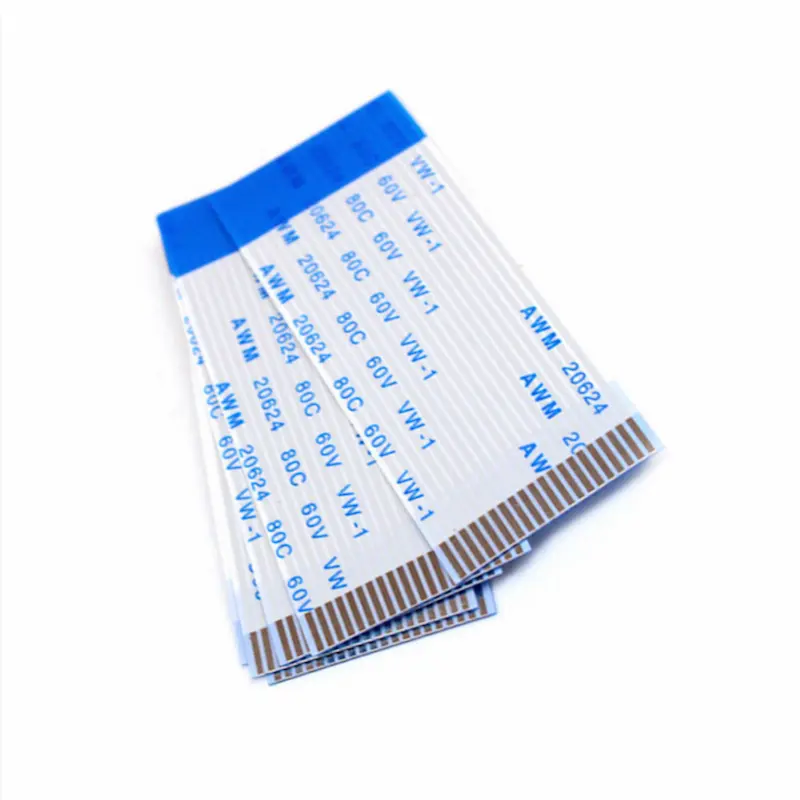
For most LCD/Display FFC cables, start with your connector pitch. If the connector is 0.5mm, choose 0.5mm FFC (common for compact displays and high pin counts). If the connector is 1.0mm, choose 1.0mm FFC (more robust handling, easier assembly). Then confirm pin count, contact side (Type A/B), cable thickness, EMI/shielding needs, and bend area.
Send your connector part number + pitch + pin count + cable length — we will quote in 8 hours.
To choose FFC cable pitch, you must match it to your connector and what you need it for. Pitch refers to the space between contacts, which determines how many conductors can fit in one area. If you select the wrong pitch, you might encounter issues with compatibility and longevity. Smaller pitches, such as 0.5mm, save space in electronics but require more careful manufacturing. Factors like temperature and humidity can also affect connector performance. YLS offers Flexible Flat Cable options that you can customize to fit your specific needs. These cables provide enhanced performance and greater flexibility. The table below illustrates how YLS’s custom cables differ from standard ones:
Aspect | Customizable FFC Cables (YLS) | Standard Cables |
|---|---|---|
Performance | Made for special needs | Works for most applications |
Flexibility | Bends easily for unique shapes | Typically stiff |
Space Efficiency | Ideal for compact spaces | Requires more room |
Reliability | Performs well in challenging environments | Varies in performance |
Customization | Numerous options to choose from | Limited sizes available |
What is FFC cable pitch
FFC cable pitch definition
FFC cable pitch refers to the distance from the center of one conductor to the center of the next conductor in a flexible flat cable. You will often see this measurement listed in millimeters. Pitch is a key feature because it tells you how close the wires are to each other. When you look at an FFC cable, you can see the parallel lines running side by side. The pitch controls how many of these lines fit into a certain width.
Common pitch sizes include:
0.5 mm
0.8 mm
1.0 mm
1.25 mm
2.54 mm
You will find 0.5 mm and 1.0 mm pitches in many consumer electronics, such as laptops, printers, and cameras. Some devices use 1.25 mm or 2.54 mm for special signal needs or larger connectors. YLS Flexible Flat Cables offer a wide range of pitch options, so you can choose the exact spacing that matches your device or project. This flexibility helps you avoid compatibility issues and makes installation easier.
Why pitch matters
Pitch plays a big role in electronic design. If you pick the wrong pitch, your cable may not fit the connector, or it may not carry signals the way you need. The pitch affects several important factors:
Compatibility: The cable must match the connector’s pitch. If the spacing is off, the cable will not connect properly.
Signal Integrity: Smaller pitches allow more conductors in a small space, which is great for high-density designs. However, if the wires are too close, signals can interfere with each other.
Mechanical Strength: Wider pitches can make the cable stronger but less flexible. Thinner cables bend more easily but may not handle as much stress.
When you design a device, you must think about how much space you have, how many signals you need to send, and how reliable the connection must be. The pitch you choose will impact all these areas. YLS Flexible Flat Cables let you customize the pitch, so you get the right balance of size, strength, and performance for your application.
Tip: Always check your connector’s datasheet and your device’s requirements before choosing an FFC cable pitch. This step helps you avoid costly mistakes and ensures your project works as planned.
Item 0.5mm Pitch (Display common) 1.0mm Pitch (More robust) Best for Compact displays, high pin-count, slim devices Larger connectors, easier assembly, stronger handling Pros Saves space, higher density, common in laptops/cameras/LCD modules More tolerance in assembly, better mechanical robustness Watch-outs Needs precise connector match & insertion; higher risk of handling damage Uses more space; lower density for same width Typical use LCD FFC, camera modules, compact HMI Industrial displays, serviceable modules, larger housings Recommendation Choose if your connector is 0.5mm and space is tight Choose if your connector is 1.0mm or you want easier handling
Need help choosing 0.5mm or 1.0mm for your display?
Send: pitch + pins + length + connector PN + contact side (Type A/B).
We reply with a quote in 8 hours.
Key factors to choose FFC cable
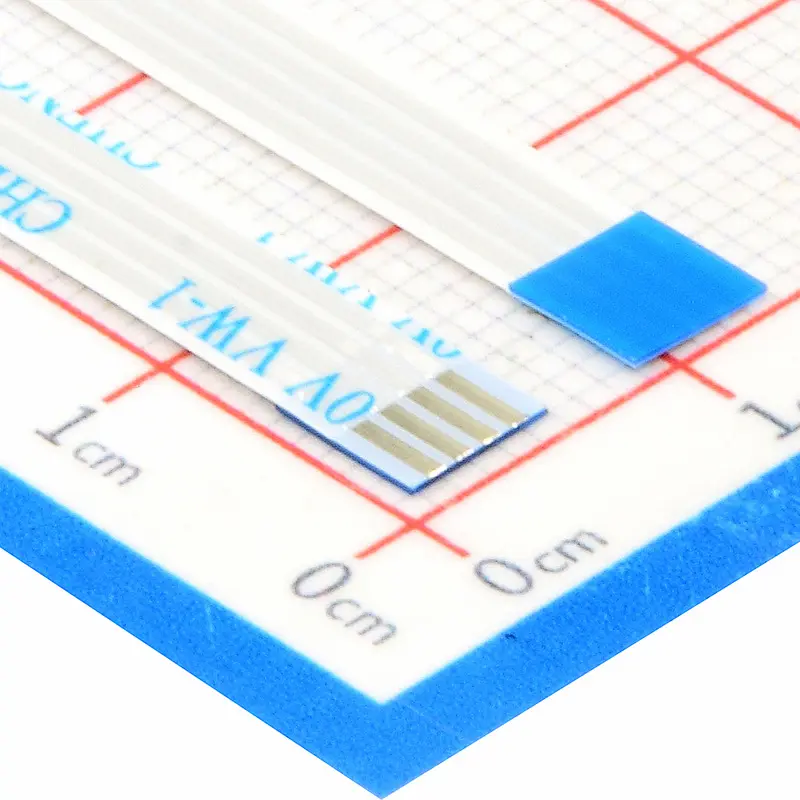
When you pick an FFC cable pitch, you need to think about a few things. Each thing can change how well your cable works in your device. Knowing these things helps you pick the best cable for good performance and reliability. YLS has flexible flat cables you can change to fit what you need.
Connector compatibility
You have to match the cable pitch with your connector. The connector’s details, like pitch and conductor width, tell you what cable you can use. Smaller pitches, such as 0.5 mm or 1.0 mm, are good for tight spaces and help keep signals clear. If you pick the wrong pitch, the cable will not fit or might lose signals. Many electronics use small connectors, so matching the pitch is very important.
Tip: Always look at your connector’s datasheet before you choose an FFC cable.
Electrical and signal needs
You should think about voltage, current, and how fast data moves. Different pitches work with different electrical ratings. For example, display cables often use 30V, car cables use 60V, and factory cables use 100V. Fast data needs a pitch that stops interference and keeps signals steady.
FFC Type | Typical Voltage Rating | Application Example |
|---|---|---|
Display FFC | 30V | LCD panels |
Automotive FFC | 60V | Vehicle electronics |
Industrial FFC | 100V | Factory automation |
Mechanical and space constraints
You need to think about how much room you have and how bendy the cable should be. Smaller pitches, like 0.3 mm, save space and make things tiny. These cables fit in small spots but need careful handling. Wider pitches, such as 0.5 mm, give a good mix of size and strength. Small devices, like phones and tablets, often need very thin cables.
Pitch Type | Characteristics | Trade-offs |
|---|---|---|
0.3mm | Ultra-compact, high-density | Higher cost, lower strength |
0.5mm | Standard, reliable | Needs precision assembly |
Application environment
You need to think about where your cable will be used. High humidity and heat can hurt FFC cables. Water in the air can make insulation swell and get weak. Very hot or cold places can make the cable grow or shrink, which makes it less reliable. Heat and cold changes can cause tiny cracks and make the cable fail.
High temperatures make cables wear out faster.
Changing temperatures cause stress on the cable.
YLS can make cables that work well in tough places, so your device stays strong.
Note: Custom cables help you get the right fit for space, performance, and tough environments.
How to choose FFC cable for your application
Choosing the right FFC cable for your project can seem complex, but you can break it down into clear steps. Each step helps you avoid mistakes and ensures your device works as planned. When you choose FFC cable, you want to match the pitch, pin count, and connector type to your needs. YLS offers rapid prototyping and expert support, so you can test and refine your choice quickly.
Identify connector specs
Start by checking your connector’s specifications. You need to know the pitch, pin count, and type. If you skip this step, your cable may not fit or work correctly. Measure the width and thickness of your existing cable if you have one. Many 12-pin FFCs measure between 4.0 mm and 6.5 mm wide and 0.2 mm to 0.3 mm thick. Even a small mismatch can cause the connector to bind or fail.
You should also check the pin numbering scheme. Use a multimeter to test continuity between a known net, like ground or power, and pin 1. Do not rely only on the silkscreen or markings. This step helps you avoid wiring errors that can damage your device.
Display connector tip
Many display assemblies use ZIF/flip-lock connectors. Always match pitch first, then confirm the contact side and cable thickness. Even with the same pitch, a mismatch in Type A/Type B or thickness can cause poor contact or intermittent display issues (flicker/lines/no image).How to confirm Type A vs Type B quickly:
- Type A: contacts on the same side at both ends
- Type B: contacts on opposite sides at each end
If unsure, send a photo of both ends (front/back) with your connector model—we can confirm in minutes.
Assess electrical and mechanical needs
Next, think about what your application requires for power and data. You need to know the voltage, current, and signal speed. If you choose FFC cable with the wrong pitch or conductor size, you may see signal loss or overheating. For example, display cables often use 30V, while automotive cables use 60V. High-speed data lines need cables that reduce interference.
Mechanical needs matter too. Ask yourself how much space you have and how much the cable will bend. If your device is small, you may need a cable with a 0.5 mm pitch or less. If your cable bends often, choose one designed for flexibility. Picking the right cable keeps your device safe and reliable.
Application | Typical Voltage | Pitch Size | Why It Matters |
|---|---|---|---|
LCD Display | 30V | 0.5mm | Prevents signal loss in tight spaces |
Automotive ECU | 60V | 1.0mm | Handles higher power safely |
Robotics Arm | 100V | 1.25mm | Withstands frequent movement |
Review manufacturer recommendations
Always check the datasheets and guidelines from your cable and connector suppliers. Reliable manufacturers, like YLS, provide full mechanical drawings and detailed specs. If you only see “12 pin” listed, but no pitch, temperature, or flame rating, you should look for another supplier. Good documentation helps you avoid costly errors and ensures your cable meets safety standards.
YLS offers detailed datasheets and expert advice. You can contact their team for help with custom designs or to answer technical questions. This support helps you choose FFC cable that fits your exact needs.
Note: Never assume that all cables with the same pin count are compatible. Pin order and pitch can vary between brands and models.
Test with samples or prototypes
Before you order large quantities, test your choice with samples or prototypes. This step lets you check fit, function, and durability in real-world conditions. If you order a cable that is too long, you may see more noise or risk snagging. If you pick the wrong pitch, the cable will not fit your connector.
YLS can provide samples within 48 hours, so you can quickly test and adjust your design. Rapid prototyping helps you catch problems early and avoid delays in your project.
Callout: Testing with real samples helps you find issues before they become expensive mistakes. It also lets you see how the cable performs in your actual device.
When you follow these steps, you understand why each detail matters. You avoid common pitfalls and make sure your device works as planned. YLS supports you at every stage, from choosing specs to rapid prototyping. This process helps you choose FFC cable that delivers the best performance and reliability for your application.
Common mistakes when choosing FFC cable
When picking FFC cable, you want to avoid mistakes. These mistakes can make your device stop working. Knowing why mistakes happen helps you choose better and finish your project.
Mismatched pitch and connector
Some people do not check if the pitch fits the connector. This happens because pitches can look almost the same. If the pitch is wrong, the cable will not fit right. You might get bad signals or break the connector. Always look at the connector’s datasheet before picking a cable. Measure the pitch to be sure. If you are not sure, ask for a sample or talk to an expert.
Tip: YLS has experts who can help you match the pitch and connector for your project.
Ignoring electrical or space limits
Some people forget to check voltage, current, or space for the cable. Using the wrong cable can make it overheat or break. Small spaces need cables with smaller pitches, but these are harder to use. Always check your device’s power needs and how much space you have. Picking the wrong size can cause signal loss or stress on the cable.
Mistake | Why It Happens | How to Avoid |
|---|---|---|
Wrong voltage rating | Not checking the datasheet | Look at specs before buying |
Too large for space | Not measuring the device | Measure and plan the layout |
Overlooking application environment
You might not think about where the cable will be used. Heat, water, or lots of movement can hurt normal cables. If you do not pick a cable for tough places, it might break early. Always think about temperature, water, and how much the cable will bend. YLS can make cables for special places, so your device works well.
Note: If you are not sure, ask YLS for help. Their team can help you avoid mistakes and pick the best cable for your project.
Avoid costly rework: confirm pitch + orientation before ordering.
Upload your drawing/spec and get an 8-hour quote.
FFC cable pitch quick reference
Pitch sizes and typical uses
Pitch size is important when picking an FFC cable. It changes how many wires fit in a small space. It also affects how strong the cable is and how well signals move. If you pick the right pitch, your device works better and lasts longer. YLS Flexible Flat Cables have many pitch sizes. You can find one that fits your project.
Here is a quick table to show why each pitch size is good for certain uses:
Pitch Size | Typical Application | Why Choose This Pitch? | YLS Example Product |
|---|---|---|---|
0.4 mm | Smartphones, tablets | Saves space in tiny devices; supports high pin counts | Ultra-thin FFC for mobile devices |
0.5 mm | Laptops, cameras, displays | Balances compact size with signal quality | Display FFC for LCD panels |
0.8 mm | Printers, scanners | Handles moderate current; easy to assemble | Standard FFC for office equipment |
1.0 mm | Automotive, robotics | Stronger and more durable; good for moving parts | Automotive FFC for ECUs |
1.25 mm | Industrial controls | Withstands higher voltage and frequent bending | Industrial FFC for automation |
2.54 mm | Prototyping, test boards | Easy to handle and solder; used for testing | Custom FFC for development kits |
Tip: Make sure the pitch size matches your connector and device needs. Using the wrong pitch can cause bad connections or signal loss.
Each pitch size has its own reason for use. Smaller pitches are best for saving space. Bigger pitches are good for strength or higher voltage. YLS has flexible flat cables in all these sizes. You can always find the right cable for your project.
If you need something special, YLS can change the pitch and cable design for you. This helps you get the best performance and reliability every time.
When you pick the right FFC cable pitch, your device works better and lasts longer. You need to match the pitch to your connector and what your device needs because:
The thickness of the cable changes how hard it presses on the connector, which keeps the connection strong.
If the force is too low, signals can get weak. If the force is too high, the cable can break.
Choosing the right pitch helps stop signal loss and device problems. For the best results, you can ask YLS for custom cables.
Benefit | Description |
|---|---|
Engineering-driven solutions | You get cables made just for your project. |
Compliance readiness | All cables follow safety and industry rules. |
Reliable communication | You can talk to project managers for help and answers. |
Remember, picking the right pitch means fewer fixes and better device performance.
FAQ
Is 0.5mm pitch always better for displays?
Not always. Use 0.5mm when the connector is 0.5mm and space/pin density matters. If your connector is 1.0mm, choose 1.0mm for reliable fit and handling.
How do I know if my display FFC is Type A or Type B?
Check whether exposed contacts face the same side at both ends (Type A) or opposite sides (Type B). Photos of both ends help confirm.
Can I replace a 0.5mm FFC with a 1.0mm FFC?
No. Pitch must match the connector. Changing pitch requires changing the connector and often the footprint.
What info do you need for a fast quote?
Pitch, pin count, length, Type A/B, thickness, stiffener, and whether shielding/ground lines are needed.
Get a Quote in 8 Hours — What to Send
- Connector part number / datasheet (or clear photo)
- Pitch: 0.5mm or 1.0mm
- Pins (circuits)
- Length (mm)
- Type A / Type B
- Thickness + stiffener requirements
- Shielding / grounding (if for high-speed display signals)
- Quantity (prototype + mass production)
